


各局皆様、こんにちは。アマチュア無線局、JS2IIUです。
前回の記事ではFlightAwareからAeroAPIを使ってフライト情報を取得するサンプルを動かしました。今回は、指定したエリアを飛行する飛行機を検索し、その中から特定の飛行機を選んで、軌跡データの取得を試みます。
本記事のサンプルコードはあくまで参考としてください。コードの実行は自己責任でお願いします。
この記事の概要
- AeroAPIで指定した範囲内にいる航空機を検索する「GET /flights/search」
- 航空機のIDをAeroAPIから取得したJSONから抽出する
- AeroAPIで指定した航空機IDの飛行奇跡を取得する「GET /flights/{id}/track」
指定した範囲内にいる航空機の検索
AeroAPIで検索します。さまざまな検索オプションが用意されていますが、今回は緯度経度で範囲指定して、その範囲内にある航空機、という条件での検索です。詳細はAeroAPIドキュメンテーション(https://ja.flightaware.com/aeroapi/portal/documentation#get-/flights/search)を参照してください。
Search for flights
GET /flights/search
Search for airborne flights by matching against various parameters including geospatial data. Uses a simplified query syntax compared to /flights/search/advanced.


PostmanでAPIの動作確認する
クエリに「-latlong “MINLAT MINLON MAXLAT MAXLON”」を指定すれば良いことが分かりました。まずPostmanで試してみます。Parameterにクエリを登録します。ざっくり愛知県周辺のエリアを指定するのに、Google Mapsで緯度経度を調べました。検索結果が返ってきました。ここの航空機の情報、便名、出発地と目的地、現在地情報などが取得できています。

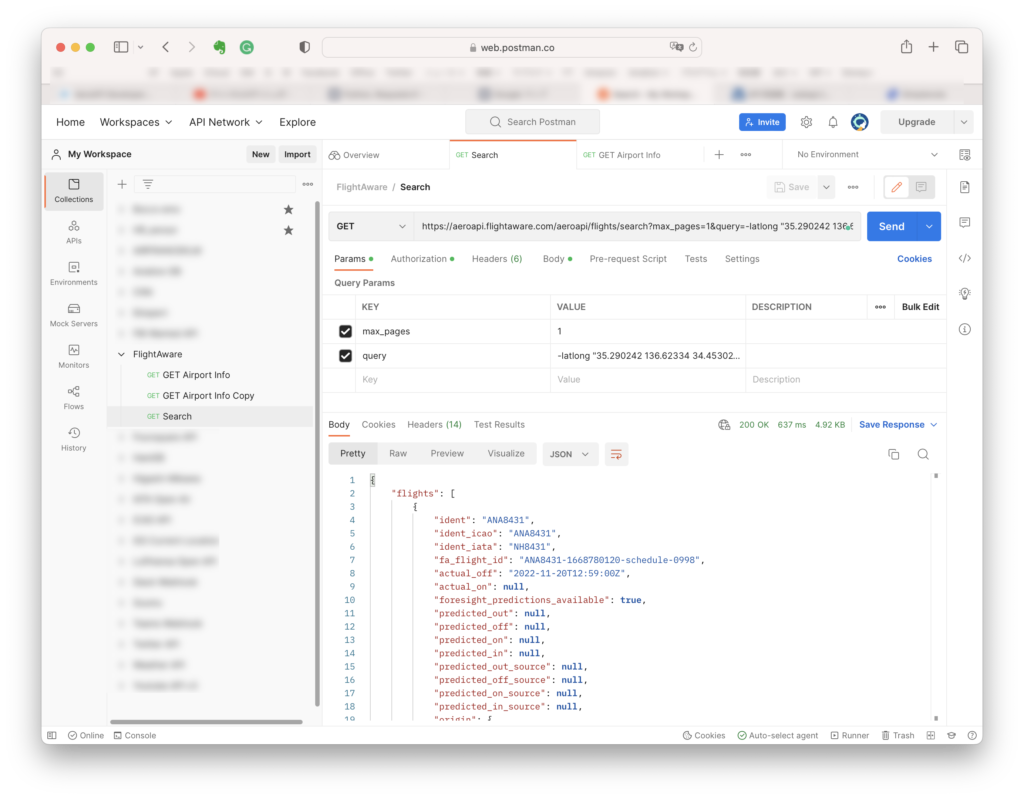
{
"flights": [
{
"ident": "ANA8431",
"ident_icao": "ANA8431",
"ident_iata": "NH8431",
"fa_flight_id": "ANA8431-1668780120-schedule-0998",
"actual_off": "2022-11-20T12:59:00Z",
"actual_on": null,
"foresight_predictions_available": true,
"predicted_out": null,
"predicted_off": null,
"predicted_on": null,
"predicted_in": null,
"predicted_out_source": null,
"predicted_off_source": null,
"predicted_on_source": null,
"predicted_in_source": null,
"origin": {
"code": "RJAA",
"code_icao": "RJAA",
"code_iata": "NRT",
"code_lid": null,
"timezone": "Asia/Tokyo",
"name": "Narita Int'l",
"city": "Tokyo (Narita)",
"airport_info_url": "/airports/RJAA"
},
"destination": {
"code": "ZSPD",
"code_icao": "ZSPD",
"code_iata": "PVG",
"code_lid": null,
"timezone": "Asia/Shanghai",
"name": "Shanghai Pudong Int'l",
"city": "Shanghai",
"airport_info_url": "/airports/ZSPD"
},
"waypoints": [],
"first_position_time": "2022-11-20T12:46:25Z",
"last_position": {
"fa_flight_id": "ANA8431-1668780120-schedule-0998",
"altitude": 300,
"altitude_change": "C",
"groundspeed": 409,
"heading": 255,
"latitude": 35.10493,
"longitude": 136.97765,
"timestamp": "2022-11-20T13:32:37Z",
"update_type": "A"
},
"bounding_box": [
35.99475,
136.97765,
35.10493,
140.39098
],
"ident_prefix": null,
"aircraft_type": "B763"
},
(以下略)
PythonでAPIの動作確認する
同じことをPythonでやってみます。
import requests
from urllib.parse import urlencode

apiKey = ' (YOUR API KEY HERE) '
apiUrl = "https://aeroapi.flightaware.com/aeroapi/"

payload = {'max_pages': 1}
auth_header = {'x-apikey':apiKey}


def get_search(MINLAT, MINLON, MAXLAT, MAXLON):

    search_string = '-latlong "' + str(MINLAT) + ' ' + str(MINLON) + ' ' + str(MAXLAT) + ' ' + str(MAXLON) +'"'
    query_string_dict = {
        'query': search_string,
        'max_pages': 1
    }

    payload = urlencode(query_string_dict)

    response = requests.get(apiUrl + f"flights/search", params=payload, headers=auth_header)

    if response.status_code == 200:
        print(response.json())
    else:
        print("Error executing request")

if __name__ == '__main__':
    get_search(35.290242, 136.623340, 34.453028, 137.717060)
レスポンスは以下の通りになりました。今度はスターフライヤーのA320が一番目に検索されました。
{'flights': [{'ident': 'SFJ95', 'ident_icao': 'SFJ95', 'ident_iata': '7G95', 'fa_flight_id': 'SFJ95-1668752738-airline-0212', 'actual_off': '2022-11-20T13:12:41Z', 'actual_on': None, 'foresight_predictions_available': True, 'predicted_out': None, 'predicted_off': None, 'predicted_on': None, 'predicted_in': None, 'predicted_out_source': None, 'predicted_off_source': None, 'predicted_on_source': None, 'predicted_in_source': None, 'origin': {'code': 'RJTT', 'code_icao': 'RJTT', 'code_iata': 'HND', 'code_lid': None, 'timezone': 'Asia/Tokyo', 'name': "Tokyo Int'l (Haneda)", 'city': 'Ota', 'airport_info_url': '/airports/RJTT'}, 'destination': {'code': 'RJFR', 'code_icao': 'RJFR', 'code_iata': 'KKJ', 'code_lid': None, 'timezone': 'Asia/Tokyo', 'name': 'New Kitakyushu', 'city': 'Kitakyushu', 'airport_info_url': '/airports/RJFR'}, 'waypoints': [], 'first_position_time': '2022-11-20T12:59:46Z', 'last_position': {'fa_flight_id': 'SFJ95-1668752738-airline-0212', 'altitude': 360, 'altitude_change': 'D', 'groundspeed': 375, 'heading': 259, 'latitude': 35.10923, 'longitude': 136.89423, 'timestamp': '2022-11-20T13:40:06Z', 'update_type': 'A'}, 'bounding_box': [35.54633, 136.89423, 35.10923, 139.86607], 'ident_prefix': None, 'aircraft_type': 'A320'}, {'ident': 'APJ466', 'ident_icao': 'APJ466', 'ident_iata': 'MM466', 'fa_flight_id': 'APJ466-1668772380-schedule-0824', 'actual_off': '2022-11-20T11:52:20Z', 'actual_on': None, 'foresight_predictions_available': True, 'predicted_out': None, 'predicted_off': None, 'predicted_on': None, 'predicted_in': None, 'predicted_out_source': None, 'predicted_off_source': None, 'predicted_on_source': None, 'predicted_in_source': None, 'origin': {'code': 'RJCC', 'code_icao': 'RJCC', 'code_iata': 'CTS', 'code_lid': None, 'timezone': 'Asia/Tokyo', 'name': 'New Chitose', 'city': 'Chitose', 'airport_info_url': '/airports/RJCC'}, 'destination': {'code': 'RJGG', 'code_icao': 'RJGG', 'code_iata': 'NGO', 'code_lid': None, 'timezone': 'Asia/Tokyo', 'name': "Chubu Centrair Int'l (Centrair)", 'city': 'Chita', 'airport_info_url': '/airports/RJGG'}, 'waypoints': [], 'first_position_time': '2022-11-20T11:40:50Z', 'last_position': {'fa_flight_id': 'APJ466-1668772380-schedule-0824', 'altitude': 1, 'altitude_change': 'D', 'groundspeed': 143, 'heading': 348, 'latitude': 34.83408, 'longitude': 136.81123, 'timestamp': '2022-11-20T13:23:17Z', 'update_type': 'A'}, 'bounding_box': [42.79127, 136.81123, 34.67546, 141.72295], 'ident_prefix': None, 'aircraft_type': 'A320'}], 'links': None, 'num_pages': 1}
検索結果からFlightAwareのフライトIDを抜き出す
JSONオブジェクトからfa_flight_idを取り出します。記事の上の方にあるpythonプログラムの一部を以下のように書き換えます。
def get_search(MINLAT, MINLON, MAXLAT, MAXLON):

    search_string = '-latlong "' + str(MINLAT) + ' ' + str(MINLON) + ' ' + str(MAXLAT) + ' ' + str(MAXLON) +'"'
    query_string_dict = {
        'query': search_string,
        'max_pages': 1
    }

    payload = urlencode(query_string_dict)

    response = requests.get(apiUrl + f"flights/search", params=payload, headers=auth_header)

    if response.status_code == 200:
        # print(response.json())
        jsonData = response.json()
        print(jsonData["flights"][0]["fa_flight_id"])
    else:
        print("Error executing request")
実行すると、以下の通り、一番最初に検索された航空機のfa_flight_idを取得することができました。
SJO624-1668855840-schedule-1252
飛行ルートデータを取得する
AeroAPIではFlightAwareフライトIDを使って飛行ルートデータの取得が可能です。ドキュメンテーションのGet flight’s trackを参照してください。(https://ja.flightaware.com/aeroapi/portal/documentation#get-/flights/-id-/track)
Get flight’s track
GET /flights/{id}/track
Returns the track for a flight as an array of positions. Data from up to 10 days ago can be obtained. If looking for older data, please use the corresponding historical endpoint.

Postmanで飛行ルートデータを取得する
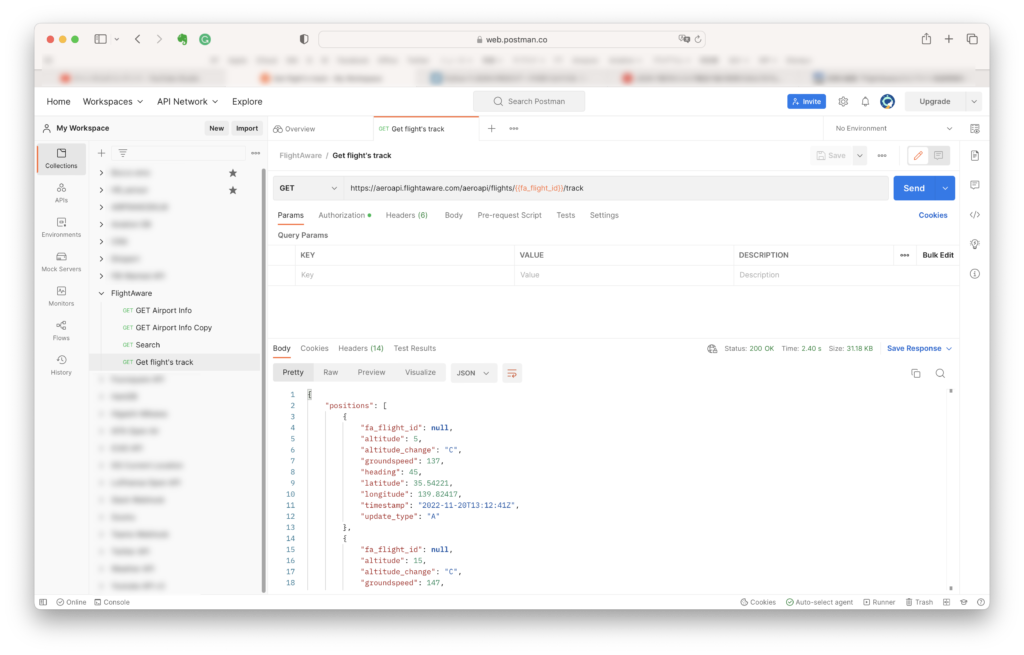
まずPostomanで動作を確認します。飛行ルートデータが取得できました。

Pythonで飛行ルートデータを取得する
同じことをPythonでもやってみます。
import requests

apiKey = '(ここにAPIキー)
apiUrl = "https://aeroapi.flightaware.com/aeroapi/"


payload = {'max_pages': 1}
auth_header = {'x-apikey':apiKey}


def get_flight_route(fa_flight_id):

    response = requests.get(apiUrl + f"flights/{fa_flight_id}/track", headers=auth_header)
    # no max_pages params required

    if response.status_code == 200:
        print(response.json())
    else:
        print("Error executing request")

if __name__ == '__main__':

    get_flight_route('SFJ95-1668752738-airline-0212')
こちらも無事にレスポンスが返ってきました。altitude, groundspeed, heading, latitude, longitude, timestamp の情報があれば、地図上にプロットすることができそうです。
{'positions': [{'fa_flight_id': None, 'altitude': 5, 'altitude_change': 'C', 'groundspeed': 137, 'heading': 45, 'latitude': 35.54221, 'longitude': 139.82417, 'timestamp': '2022-11-20T13:12:41Z', 'update_type': 'A'}, {'fa_flight_id': None, 'altitude': 15, 'altitude_change': 'C', 'groundspeed': 147, 'heading': 93, 'latitude': 35.5458, 'longitude': 139.83797, 'timestamp': '2022-11-20T13:12:58Z', 'update_type': 'A'}, {'fa_flight_id': None, 'altitude': 23, 'altitude_change': 'C', 'groundspeed': 149, 'heading': 134, 'latitude': 35.54141, 'longitude': 139.84811, 'timestamp': '2022-11-20T13:13:14Z', 'update_type': 'A'}, {'fa_flight_id': None, 'altitude': 32, 'altitude_change': 'C', 'groundspeed': 142, 'heading': 157, 'latitude': 35.53093, 'longitude': 139.85527, 'timestamp': '2022-11-20T13:13:30Z', 'update_type': 'A'}, {'fa_flight_id': None, 'altitude': 36, 'altitude_change': 'C', 'groundspeed': 152, 'heading': 158, 'latitude': 35.52164, 'longitude': 139.85995, 'timestamp': '2022-11-20T13:13:46Z', 'update_type': 'A'}, {'fa_flight_id': None, 'altitude': 40, 'altitude_change': 'C', 'groundspeed': 169, 'heading': 160, 'latitude': 35.50977, 'longitude': 139.86601, 'timestamp': '2022-11-20T13:14:04Z', 'update_type': 'A'}, {'fa_flight_id': None, 'altitude': 44, 'altitude_change': 'C', 'groundspeed': 202, 'heading': 199, 'latitude': 35.49487, 'longitude': 139.86607, 'timestamp': '2022-11-20T13:14:21Z', 'update_type': 'A'}, {'fa_flight_id': None, 'altitude': 47, 'altitude_change': 'C', 'groundspeed': 244, 'heading': 238, 'latitude': 35.48081, 'longitude': 139.85133, 'timestamp': '2022-11-20T13:14:39Z', 'update_type': 'A'}, {'fa_flight_id': None, 'altitude': 62, 'altitude_change': 'C', 'groundspeed': 252, 'heading': 248, 'latitude': 35.46776, 'longitude': 139.81522, 'timestamp': '2022-11-20T13:15:05Z', 'update_type': 'A'},

(以下略)
このテストを終えるまでに、通算で$0.62の請求となっていました。$5まではフリーで使えるのですが、ちょっと心許ない数字です。意図しない請求を防ぐためにもAPIUsageをちょくちょく確認することを強くお勧めします。
最後まで読んでいただき有難うございました。73