
こんにちは、JS2IIUです。
この記事では、PythonのStreamlitを使って、3段階で通知音を鳴らすタイマーアプリを作成する方法を紹介します。このアプリは、指定した時間にベル音を鳴らすことで、作業時間や休憩時間を知らせてくれます。
Streamlitとは?
Streamlitは、Pythonでデータサイエンスや機械学習のWebアプリケーションを簡単に作成できるオープンソースのフレームワークです。Streamlitを使うことで、Web開発の知識がなくても、PythonのコードだけでインタラクティブなWebアプリを構築できます。
Streamlitの特徴は以下の点が挙げられます。
- シンプルで直感的なAPI: Pythonのスクリプトに数行のコードを追加するだけで、Webアプリを作成できます。
- インタラクティブなウィジェット: スライダー、ボタン、テキスト入力などのウィジェットを簡単に追加して、ユーザーとのインタラクションを実現できます。
- 高速なプロトタイピング: コードを変更するとすぐにブラウザに反映されるため、高速な開発が可能です。
参考記事
Streamlitに関する入門的な内容の記事をいくつか紹介します。ぜひ覗いてみて下さい。


タイマーアプリの作り方
それでは、Streamlitを使って3段階通知のタイマーアプリを作成していきましょう。
必要なライブラリ
まず、以下のライブラリをインストールする必要があります。
pip install streamlit playsoundstreamlit: Streamlitの本体です。playsound: 音声ファイルを再生するためのライブラリです。
playsound周りの警告、エラー
playsoundのインストールで警告やエラーが出る場合があります。
  Getting requirements to build wheel ... error
  error: subprocess-exited-with-error

  × Getting requirements to build wheel did not run successfully.
  │ exit code: 1
╰─> [28 lines of output] OSError: could not get source code
[end of output]
note: This error originates from a subprocess, and is likely not a problem with pip.
error: subprocess-exited-with-error
× Getting requirements to build wheel did not run successfully.
│ exit code: 1
╰─> See above for output.この場合は、pip install --upgrade wheelを実行してみます。
pip install --upgrade wheelこれでplaysoundのインストールは正常に行われるはずです。
さらに、playsoundを実行させたときに以下の警告メッセージが表示される場合があります。
playsound is relying on a python 2 subprocess. Please use `pip3 install PyObjC` if you want playsound to run more efficiently.メッセージにある通り、pip3 install PyObjCを実行します。
pip3 install PyObjCこれでエラーや警告が出ることなく実行できるようになりました。
コードの解説
以下がタイマーアプリの完全なコードです。
なお、チーン、というベルの音の音声ファイルは別途ご用意ください。
import streamlit as st
import time
from playsound import playsound

# 初期設定
if "start_time" not in st.session_state:
    st.session_state.start_time = 0
if "pause_time" not in st.session_state:
    st.session_state.pause_time = 0
if "remaining_time" not in st.session_state:
    st.session_state.remaining_time = 0
if "running" not in st.session_state:
    st.session_state.running = False
if "first_bell" not in st.session_state:
    st.session_state.first_bell = True
if "second_bell" not in st.session_state:
    st.session_state.second_bell = True
if "third_bell" not in st.session_state:
    st.session_state.third_bell = True

# ページ設定
st.set_page_config(page_title='Bell Timer', page_icon=':clock3:')

# タイマー時間の設定
first_bell_time = st.sidebar.number_input("最初のベル (分)", min_value=1, value=5)
second_bell_time = st.sidebar.number_input("2番目のベル (分)", min_value=first_bell_time, value=10)
third_bell_time = st.sidebar.number_input("3番目のベル (分)", min_value=second_bell_time, value=15)

# ボタンの配置
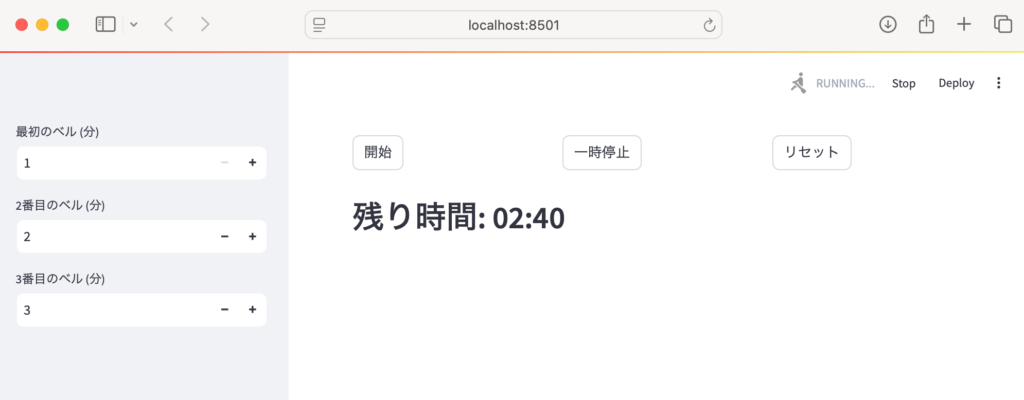
col1, col2, col3 = st.columns(3)
start_button = col1.button("開始")
pause_button = col2.button("一時停止")
reset_button = col3.button("リセット")

# 開始ボタン
if start_button:
    if not st.session_state.running:
        st.session_state.start_time = time.time() - st.session_state.remaining_time
        st.session_state.running = True

# 一時停止ボタン
if pause_button:
    if st.session_state.running:
        st.session_state.pause_time = time.time()
        st.session_state.remaining_time = time.time() - st.session_state.start_time
        st.session_state.running = False

# リセットボタン
if reset_button:
    st.session_state.start_time = 0
    st.session_state.pause_time = 0
    st.session_state.remaining_time = 0
    st.session_state.running = False
    st.session_state.first_bell = True
    st.session_state.second_bell = True
    st.session_state.third_bell = True

# タイマーの実行
if st.session_state.running:
    placeholder = st.empty()

    while st.session_state.running:
        elapsed_time = time.time() - st.session_state.start_time
        remaining_time_sec = int(third_bell_time * 60 - elapsed_time)

        with placeholder.container():
            st.header(f"残り時間: {remaining_time_sec // 60:02d}:{remaining_time_sec % 60:02d}")

        if elapsed_time >= first_bell_time * 60 and st.session_state.first_bell:
            playsound("main2/bell.mp3")
            st.session_state.first_bell = False
        if elapsed_time >= second_bell_time * 60 and st.session_state.second_bell:
            playsound("main2/bell.mp3")
            st.session_state.second_bell = False
        if elapsed_time >= third_bell_time * 60 and st.session_state.third_bell:
            playsound("main2/bell.mp3")
            st.session_state.third_bell = False
            st.session_state.running = False
            st.success("タイマー終了!")

        time.sleep(1)

# 停止中
elif st.session_state.remaining_time > 0:
    remaining_time_sec = int(st.session_state.remaining_time)
    st.header(f"残り時間: {remaining_time_sec // 60:02d}:{remaining_time_sec % 60:02d}")
プログラムの詳細
- 初期設定:
st.session_stateを使用して、アプリの状態を管理します。タイマーの開始時間、一時停止時間、残り時間、実行状態、各ベルの鳴動状態を保持します。 - ページ設定:
st.set_page_configでページのタイトルとアイコンを設定します。 - タイマー時間の設定:
st.sidebar.number_inputを使用して、ユーザーが3つのベルの時間を設定できるようにします。min_valueを設定することで、入力値に制限を加えています。 - ボタンの配置:
st.columnsを使用して、開始、一時停止、リセットボタンを並べて配置します。 - ボタンの処理: 各ボタンが押されたときの処理を記述します。
- 開始ボタン: タイマーを開始します。
- 一時停止ボタン: タイマーを一時停止します。
- リセットボタン: タイマーをリセットします。
- タイマーの実行:
st.session_state.runningが True の間、タイマーを実行します。st.empty()でプレースホルダーを作成し、残り時間を表示します。whileループで残り時間を更新し、設定された時間になったらplaysoundでベル音を鳴らします。
- 停止中: タイマーが停止中の場合、残り時間を表示します。
参考
補足
bell.mp3などの音声ファイルをmain2フォルダに配置してください。- このコードを
timer_app.pyなどのファイル名で保存し、ターミナルでstreamlit run timer_app.pyを実行すると、ブラウザでアプリを開くことができます。
このブログ記事が、Streamlitを使ったタイマーアプリ開発の参考になれば幸いです。
Pythonに関する書籍のです。
24年9月に出版された「ハイパーモダンPython-信頼性の高いワークフローを構築するモダンテクニック」、Claudio Jolowicz著、嶋田、鈴木訳。開発環境の構築、プロジェクトの管理、テストに関して実践的な内容でとても参考になる一冊です。
最後まで読んでいただきありがとうございました。


コメント